Data Storage
Sooner or later you want to retrieve or store some data somewhere. When modelling a pipeline it doesn’t always matter where. Especially when working at high abstraction levels you don’t want to make a choice of data store (just yet). We model a data store after a common symbol for a relational database table in UML, but don’t be fooled, the symbol just represent “a datastore” not a relational datastore specifically.
We mark the type of the datastore by the first letter or a short abbreviation of the actual datastore.
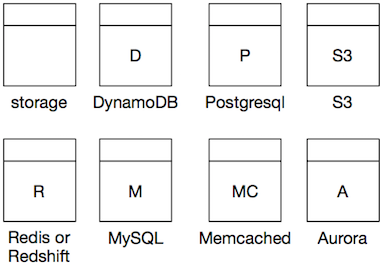
Origin of the Symbol
Modelled after the table and class icons in UML. It’s easy to draw on a whiteboard Start with something that comes close to a square and then at about 1/5th of the top, draw a horizontal line. In software, draw a square first, then position a small rectangle on top and join the shapes. That way you can write the letter of your datastore in the centre of the bottom rectangle.
Data Store Types
Below is a non extensive list of data store types. As with the processors the naming is (roughly) as follows:
- Use the first letter of the data store, capitalized. Unless the datastore has a standard abbreviation of 2 characters.
- If the resulting letter is ambiguous, this is no problem if it’s clear (to you and your team) from the diagram what the data store is.
- To disambiguate add an extra letter, or a ‘.’.
- For Aurora, add the the A after the database type.
| Data store | Symbol |
|---|---|
| DynamoDB | D |
| Postgresql | P |
| S3 | S3 |
| Redis or Redshift | R |
| Redis | RD |
| RedShift | RS |
| MySQL or Memcached | M |
| MySQL | M. |
| Memcached | MD |
| Microsoft SQL | MS |
| Aurora | A |
| Aurora MySQL | MA |
| Aurora Postgres | PA |
| Memcached | MC |
| Oracle | O |
Tables
The icon for a datastore is used to mark an individual table or collection. For example, if you indicate you want to store something in MySQL you use a datastore icon for each table you are accessing data from or writing into. Same goes for DynamoDB: you draw a data store for each table. For S3, you draw 1 data store icon per bucket. etc.